In 2026, the “React Native vs native apps” debate is less about whether React Native can feel native and more about what your app truly needs: time-to-market and shared delivery, or ultra-deep platform control for advanced graphics, complex device pipelines, and strict compliance. React Native’s New Architecture (JSI + TurboModules + Fabric) and a faster default JavaScript engine have narrowed real-world performance gaps for many business apps.
What a native app means in 2026
A native app is built for a specific OS using that platform’s first-party tools and programming languages. On iOS-family platforms, modern UI is commonly built with SwiftUI, which Apple describes as a simple way to build user interfaces across its platforms using Swift. On Android, Jetpack Compose is Google’s recommended modern toolkit for building native UI and is designed to simplify and speed up UI development.
What native typically gives you in 2026:
Native development usually offers the straightest path to new OS capabilities and the tightest control over performance-sensitive areas like rendering, animation scheduling, background execution, camera pipelines, audio/video, and security integrations. Apple’s developer documentation, for example, emphasizes using native tooling (like Xcode + Instruments) to understand and improve SwiftUI performance. Android’s platform documentation similarly highlights a robust built-in security model and system-level security features.
The main trade-off is that native commonly means separate platform workstreams (iOS and Android), especially for UI and platform-specific features—so development and maintenance can become more expensive when your product is growing quickly. (Some teams share logic with approaches like shared business layers, but the OS-specific UI and integration work is still real work.)
What a React Native app means in 2026
React Native is a cross-platform framework for building apps with React concepts while rendering native UI. React Native’s own documentation positions it as bringing React to native development.
The biggest 2026 story is that React Native performance and responsiveness have improved because the framework has been rolling out its New Architecture, which replaces the legacy asynchronous “bridge” with a direct interface approach (JSI) and a modern rendering system (Fabric).

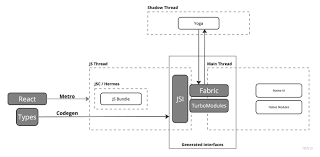
Key 2026 technical realities that matter for business decisions:
React Native’s architecture docs describe that the New Architecture removes the asynchronous bridge and replaces it with JSI, which enables JavaScript and native code to hold references to each other and call methods without the same serialization overhead pattern as before. Fabric is React Native’s newer rendering system, built to unify more rendering logic in C++ and improve interoperability with host platforms.
For native integrations, React Native’s Turbo Native Modules approach is designed to be more structured and type-safe: React Native provides Codegen that takes a typed spec written in TypeScript or Flow and generates platform-specific code interfaces.
On the runtime side, React Native uses the Hermes JavaScript engine by default, and RN’s own docs state Hermes can improve startup time, reduce memory usage, and reduce app size compared to JavaScriptCore for many apps. Very recently (as of mid-February 2026), the React Native release notes describe Hermes “V1” becoming the default engine in React Native 0.84 (following an experimental opt-in earlier), aiming for measurably better JavaScript performance.
For developer speed, React Native’s Fast Refresh feature is enabled by default and provides near-instant feedback when you change React components, which reduces iteration time during build/test cycles. Many teams also choose Expo tooling, which React Native’s own setup docs describe as production-grade developer tooling for React Native, including a standard library of native modules and cross-platform support paths.
React Native vs native apps in 2026
Below is the practical, business-first comparison for “React Native vs native apps” in 2026. Each factor is described the way founders and business owners usually feel it: time, money, risk, and product quality.
Development speed and time-to-market
React Native can ship faster for many products because you can deliver features across iOS and Android from a shared codebase, and tools like Fast Refresh shorten day-to-day iteration cycles. Native development can still be fast—especially with SwiftUI and Jetpack Compose speeding up UI building—but there is still more parallel work whenever the same feature needs OS-specific UI and integration.
A realistic 2026 takeaway: React Native often wins when your roadmap has frequent UI and feature iteration across both platforms and you want one coordinated release train. Native can win when you’re willing to fund two platform tracks to maximize polish and platform-first behavior.
Upfront cost and staffing
React Native can reduce upfront engineering cost because you’re not automatically doubling every screen and every business workflow across two separate native stacks. A Walmart engineering write-up on their React Native work explicitly calls out simultaneous iOS and Android development by the same team as a reason labor cost can drop substantially (their wording is “roughly in half” in that context).
However, 2026 reality: “React Native vs native apps” is rarely one team vs two teams forever. A growing React Native product usually still needs some native work (payments edge cases, advanced media, platform-specific UI, performance hot spots), and with the New Architecture migration, you may also budget time to update modules and libraries.
Performance and responsiveness
Native still has the highest ceiling for demanding workloads, but React Native’s New Architecture has narrowed the gap for many business apps. React Native’s architecture docs describe JSI removing the old class of serialization work for JavaScript–native interop, and Fabric modernizing rendering by moving more logic into a shared C++ core.
React Native also benefits from Hermes improvements: the docs describe better startup time and memory usage for many apps, and the 0.84 release notes frame Hermes V1 as a performance evolution.
A grounded rule of thumb for 2026: If your core value involves extremely performance-sensitive work (advanced 3D, heavy real-time video processing, complex camera pipelines, ultra-low-latency interactions), native is still typically the safest bet. React Native is often “fast enough” for commerce, marketplaces, dashboards, social feeds, and most content + transactional apps—especially on modern devices—when engineered well.
Long-term scope and platform change risk
Native apps live closest to OS changes. When new OS features and new UI patterns arrive, native developers can adopt them directly using first-party APIs and documentation.
React Native has become more stable long-term because it has strong ecosystem support, but there is a different kind of dependency risk: you depend on the framework and on third-party libraries keeping pace—especially during major architecture shifts. React Native’s own New Architecture announcement explicitly discusses migrating native modules/components to fully benefit and notes that future releases will remove the interop layer, meaning lagging modules eventually become a blocker.
Access to device features and third-party SDKs
Native has direct access to every OS API. React Native can access platform features, but often through native modules (and now TurboModules). React Native’s Turbo Native Modules documentation explains the Codegen + native-implementation workflow used to connect JavaScript to platform APIs.
So, in “React Native vs native apps,” native tends to win whenever you need day-one adoption of new OS APIs, or you rely on SDKs that are very platform-specific (some banking, specialized media, unusual peripherals). React Native works very well when the required SDKs are supported by maintained libraries—or when you’re willing to implement a small set of native modules for the special parts.
UI/UX fidelity
SwiftUI and Jetpack Compose are designed to let you build platform-native UI patterns quickly with high consistency to each OS’s behavior. React Native renders native UI components and can look and feel great, but pushing the most platform-specific polish (micro-interactions, complex transitions, advanced gesture behavior that differs per OS) may require more platform-specific code or native components. React Native’s own docs even provide guidance for platform-specific code when only parts of a component differ by OS.
Security and compliance
Security is not “native good, React Native bad.” In practice, most mobile breaches happen due to common issues like improper credential handling, insecure data storage, insecure communication, and supply chain weaknesses—problems that apply to any stack. The OWASP Mobile Top 10 (final release 2024) lists risks like improper credential usage, inadequate supply chain security, insecure data storage, and insecure communication as major mobile app risks.
That said, native development can make it easier to apply platform security features in a first-class way. Apple’s platform security documentation describes built-in encryption and data protection concepts, and Apple’s Keychain and Secure Enclave documentation explains how hardware-backed mechanisms protect cryptographic material and sensitive secrets. Android likewise documents the Android Keystore system for app credentials and hardware-backed key storage, and the Android platform documentation describes built-in security features and a rigorous security program.
React Native can still use these same secure primitives, but your team must be disciplined about (a) keeping dependencies healthy (supply chain) and (b) implementing sensitive features using the correct native-backed storage or modules.
Maintenance and total cost of ownership
For many businesses, the biggest cost is not version 1.0—it’s the next 24 months of fixes, OS updates, device coverage, and feature growth. React Native can lower maintenance effort because shared features can be updated once, but you still need to manage native dependencies and upgrade the framework itself, especially across big architecture transitions. Native maintenance can be heavier because platform updates and bug fixes may need to be implemented twice, but each platform upgrade path is often clearer because it follows the OS-first toolchain.
A helpful, simple 2026 TCO lens:
If your app roadmap is mostly product features and UI iterations, React Native often reduces total effort. If your roadmap is heavy on platform-specific capabilities (advanced media, complex on-device pipelines, deep hardware integration), native can be cheaper over time because you spend less time fighting abstraction limits.
Choosing between React Native vs native apps in 2026
Instead of a one-size-fits-all answer, here is a decision approach that works well for business planning in 2026.
If your top goal is speed + cost control + broad reach, React Native is often the better default—especially for MVPs and early scaling—because it supports fast iteration (Fast Refresh), shared delivery, and a mature ecosystem.
If your top goal is maximum performance ceiling + platform-first UX + deep device integration, native is often the safer choice—especially when your app’s differentiation is built on platform-specific capabilities and you can support separate platform investments.
A very common 2026 “best of both” pattern is hybrid-by-design: You build most screens in React Native, but implement a small set of native modules for the “hard parts” (high-end media, specialized hardware, edge-case SDKs). React Native’s Turbo Native Modules documentation shows exactly this model: define a typed interface and implement the native side where needed.
Also note that React Native is expanding beyond iOS and Android through “out-of-tree platforms” maintained by partners and community, including projects for Windows, macOS, and even visionOS. That can matter if your longer-term roadmap includes more devices—but it still usually requires platform-aware planning.
Real-world usage patterns in 2026
For credibility in “React Native vs native apps,” it helps to look at who is publicly using React Native today.
React Native’s official showcase explicitly lists major organizations using React Native across mobile (and sometimes desktop) experiences, including Meta, Microsoft, Amazon, Shopify, and Wix.
From an engineering perspective, big-company write-ups also show how teams think about trade-offs. In a Walmart Global Tech engineering post, engineers describe React Native as viable at large scale, reporting performance that was comparable (and in some measures better than their existing hybrid approach) for their specific app and noting the organizational advantage of shared development.
The most practical pattern you see across large teams is not “React Native everywhere” or “native everywhere,” but “use the right tool per surface area,” which is exactly why React Native continues to invest in better native interoperability through TurboModules and Fabric.
FAQs and common myths for 2026
Is React Native slower than native apps in 2026?
It depends on what you mean by “slower.” Native still has the highest performance ceiling. But React Native has reduced common bottlenecks through the New Architecture (JSI + Fabric) and through runtime improvements like Hermes. React Native’s architecture docs explicitly describe replacing the old bridge with JSI to avoid certain serialization overhead patterns, and the Hermes docs describe improved startup time and memory for many apps.
Can you convert a native app into a React Native app?
Yes, but it’s usually best thought of as a rebuild or gradual embedding, not a one-click conversion. In practice, teams often introduce React Native screens into an existing native shell, then expand coverage over time, while maintaining some native modules for platform-specific features. React Native’s docs on platform-specific code and Turbo Native Modules reflect this real-world mixed approach.
How does React Native reduce cost in the React Native vs native apps decision?
The main cost lever is shared delivery: one team can ship many features to both platforms at once, and the feedback loop can be faster. Walmart’s engineering write-up directly ties cross-platform development to reduced labor cost and faster incremental feature development. Fast Refresh also shortens the edit-test cycle, which reduces developer time spent waiting.
Does React Native support AI, machine learning, or IoT as well as native?
React Native can integrate with advanced capabilities, but usually through native SDKs and modules. The Turbo Native Modules approach is designed for exactly this: define typed interfaces and implement the native layer that talks to OS-level APIs or device SDKs. If your app is heavily on-device and performance-sensitive (for example, intensive real-time processing), native may still be the easier path.
Can React Native be used for Apple Watch, wearables, or visionOS?
React Native is primarily centered on iOS and Android, but React Native’s own documentation points to partner/community projects that bring React Native to additional platforms, including visionOS. For wearables and OS-specific companion experiences, teams often use a mix: shared logic where possible, plus native UI layers where required by the platform ecosystem and tooling.
Building for multiple platforms can get complex fast.
Let’s help you choose the right approach for your app.
👉 Book a discovery call with our team